

Google Ads Conversion Tracking: From Ad Click to Revenue
Connect Google Ads clicks, conversion events, revenue, and advertising costs. Learn what to verify in Skro before using the results to make budget decisions.
visit → outcome → feedbackIn this article
A Google Ads campaign can bring in plenty of clicks and still leave you unsure whether to keep spending. Even a conversion total can hide the answer. Does it represent purchases, submitted forms, newsletter signups, or several of those added together?
Google Ads conversion tracking is useful when the event means something clear to your business. The next step is connecting that event with the original ad interaction, its value, and its acquisition cost.
With Skro, you can bring those inputs into campaign reporting and configure conversion feedback to Google Ads. The important part is understanding what each connection does, so you can test the complete journey before relying on it.
There are three connections to verify
It's easy to say that an account is "connected" and leave it there. In practice, three different things need to work.
First, track the visit. Someone follows your ad to a landing page or offer. The campaign information and available advertising identifiers need to reach the tracking setup.
Second, record the outcome in Skro. Your website, store, or affiliate network reports the conversion. The event needs a connection to the tracked visit, along with the relevant value, currency, and transaction information.
Third, send the intended conversion to Google. If you enable conversion feedback, the event must be mapped to the appropriate conversion action and delivered through the configured integration.
These handoffs answer different questions. A visit in Skro doesn't confirm that the purchase was recorded. A purchase in Skro doesn't confirm that Google accepted it. Check each destination when you test.
Choose the business event before connecting the accounts
For a store, a purchase is usually closer to the business objective than a product view. For a lead-generation campaign, a submitted form may be useful, but you may also need to know which enquiries become qualified leads or customers.
Write down what the event represents and when it happens. "Lead" is vague if one system records a button click and another records a completed form. "Purchase" needs a clear relationship to the order and payment state used by your business.
Then decide which events should influence bidding. Google distinguishes between primary and secondary conversion actions. Under standard goals, primary actions are used for bidding when the campaign uses that goal; secondary actions are generally for observation in All conversions. Custom goals are an exception: included actions can be used for bidding regardless of that setting. Review both the action and the campaign's selected goals. Google's conversion-action guidance explains the distinction.
A newsletter signup can be worth tracking without being treated as equivalent to a paid order. Making that distinction early prevents a busy conversion report from disguising a weak sales result.
Keep Google's identifier and Skro's click ID distinct
Google Ads can supply advertising identifiers used for conversion matching. For GCLID-based conversion imports, Google's instructions require auto-tagging and capturing the actual GCLID from the ad visit. That value is case-sensitive and needs to stay connected with the later outcome. Google's GCLID setup documentation describes the requirements for that method.
Skro also generates its own click ID. This connects an incoming conversion to the visit recorded in Skro. It serves a different purpose from a Google advertising identifier, and substituting one for the other won't repair a missing connection.
Use the Google Ads template and generated tracking configuration in Skro rather than assembling a campaign link from memory. Your setup may include GCLID or other supported Google identifiers, along with campaign, ad group, creative, keyword, or placement parameters. Availability depends on the campaign and traffic involved; every field won't be populated on every visit.
Follow those values through landing pages and any intermediate links. A URL cleaner, an unexpected redirect, or a form that doesn't retain the reference can break the chain after the ad click has already been recorded. Test the final journey, including consent behavior, rather than only checking the first URL.
Connect the conversion action and its value in Skro
Skro's Google Ads integration connects an ad account with a traffic source. The documented setup synchronizes campaign, ad group, and ad costs every 30 minutes and supports checking their status and pausing or resuming them from Skro.
Conversion feedback has its own configuration. Enable Conversion API, map the Conversion Action Name, and choose whether to include conversion payout. Skro's guide requires the action name to match the one configured in Google Ads, and the campaign setup selects the action to use.
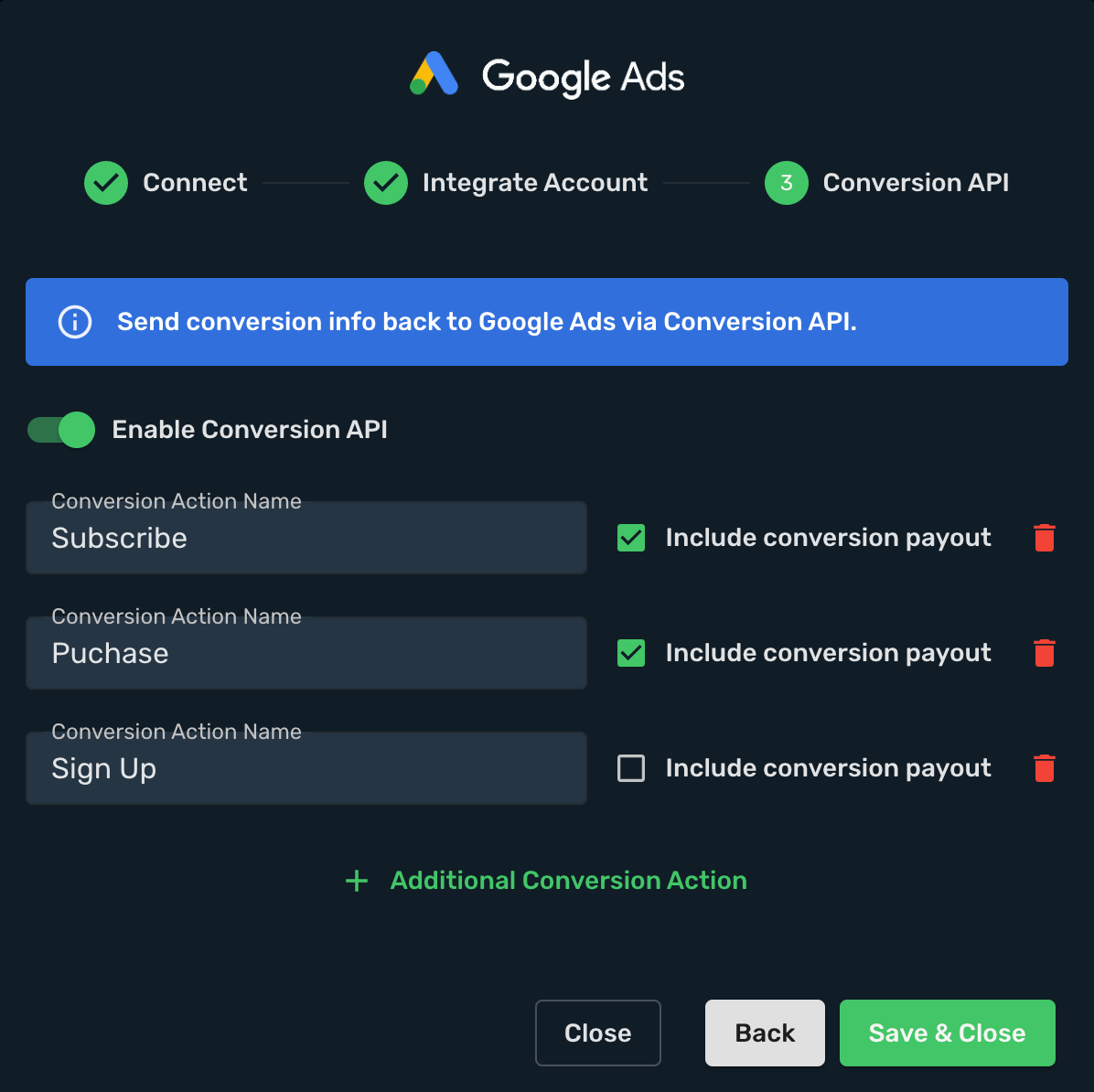
If you send a value, define what it means. Store sales revenue, an affiliate commission, and an estimated lead value are different inputs. Use the correct currency and keep that meaning consistent across reports. A €50 estimated lead value shouldn't quietly become €50 of realized sales revenue in your business review.
The Google Ads integration guide covers the account connection, tracking methods, conversion-action mapping, and campaign setup. It also explains when to use a conversion pixel or a server postback to report outcomes to Skro.
Worked example: the cheaper lead loses
Suppose two fictional lead-generation campaigns run over the same completed period. All the advertising costs have synchronized, and the sales outcomes have had enough time to arrive. The resulting sales have been reliably connected to their original leads.
| Metric | Campaign A | Campaign B |
|---|---|---|
| Advertising cost | €600 | €600 |
| Submitted leads | 30 | 20 |
| Cost per submitted lead | €20 | €30 |
| Leads that became customers | 3 | 6 |
| Recorded revenue per customer | €200 | €200 |
| Attributed sales revenue | €600 | €1,200 |
| Cost per customer | €200 | €100 |
If you stop at submitted leads, Campaign A looks better. Once you connect the sales outcomes, Campaign B acquired twice as many customers for the same spend. Its revenue-to-ad-spend ratio is 2×, compared with 1× for Campaign A. Product delivery, staff, fees, and other costs still need to be considered before calling either result profitable.
The lesson is to make the lead visible while also measuring the outcome that justifies buying more leads. If your business can reliably report qualified leads or completed sales, map those events deliberately and evaluate which should guide optimization. Skro's Custom Conversions can separate incoming events and their reporting roles; your sales system still needs to supply the later outcome and its tracking reference.
Check for duplicate purchase actions before trusting the total
A site may already have a Google Ads tag, an imported GA4 conversion, or another integration reporting purchases. Adding a new delivery route deserves a review of what is already active.
Two systems sending events is not, by itself, proof of duplicate counting. The important question is whether the same business action is being counted more than intended across conversion actions, reports, and bidding goals.
List the purchase actions, their sources, and which campaigns use them. Follow one known transaction through the setup. If two actions represent the same purchase, decide which role each should have before allowing both to influence your campaign decisions. Keep useful comparison data, but make the main sales metric unambiguous.
Give recent conversions and costs time to arrive
Advertising spend can appear before a sale does. A customer may enquire today and buy next week. Skro's scheduled cost synchronization also means the latest spend and the latest conversions may arrive at different times.
Compare a consistent reporting period and currency, then check whether each system groups outcomes by interaction date or conversion date. Use the appropriate conversion-action breakdown in Google Ads rather than comparing a mixed total with one event in Skro.
When a conversion appears in Skro but is missing from Google, inspect the outgoing action mapping, available advertising identifiers, event details, and any delivery or import diagnostics. Repeatedly submitting the same event without knowing the original result can create a new problem. Our tracking troubleshooting checklist helps you locate the first handoff that failed.
What should you test before increasing the budget?
Run one controlled journey through your actual ad and landing-page setup. Check the visit and its campaign information first. Then complete a known conversion using the supported test process for your store, network, or sales system.
Find that outcome in Skro and verify the event, value, currency, and attributed campaign. If conversion feedback is enabled, check its delivery and eventual appearance under the intended Google Ads action. Confirm the action's role in the campaign's goals, and compare the recorded cost once synchronization completes.
That gives you something more useful than a connected-account badge: a verified path from an ad interaction to an outcome you can explain. Use the Google Ads setup guide to build that path, then review cost and attributed revenue together in Skro reporting before making your next budget decision.