

S2S postback tracking: from click ID to conversion
Follow an affiliate conversion from a tracked click through the network's sub-ID and back to Skro. Understand payout, event names, and transaction references.
clickId + payout + eventIn this article
A visitor follows your campaign link and later buys from an affiliate offer. The sale happens on someone else's site. How does your campaign report learn which click produced it?
A server-to-server postback, or S2S postback, carries that outcome from the network or conversion system back to the tracker. The critical part is the identifier that connects the outcome to the original interaction.
The click ID is the link between two systems
Skro generates a click ID for a tracked campaign visit. You pass that value into a field the affiliate network can store, commonly described as a sub-ID or tracking parameter. When the outcome occurs, the network returns that stored value in Skro's clickId parameter.
The field names on either side do not need to be identical. They need to carry the same value.
| Stage | Example value or field | Job |
|---|---|---|
| Skro tracks the visit | A generated click ID | Identifies the interaction. |
| Offer URL passes it to the network | A network-supported field such as s2 | Stores the interaction reference with the visit. |
| Network reports the sale | Its macro for the saved s2 value | Returns the original reference. |
| Skro receives the callback | clickId | Matches the outcome to the tracked interaction. |
Never assume that every network uses s2, or that its return macro has a particular spelling. Use the network's Skro integration guide and its documented macros.
What a postback needs to communicate
A useful postback describes the outcome with enough information to classify it. Beyond the click ID, the supported fields can include payout, currency, status, transaction reference, and a custom conversion event.
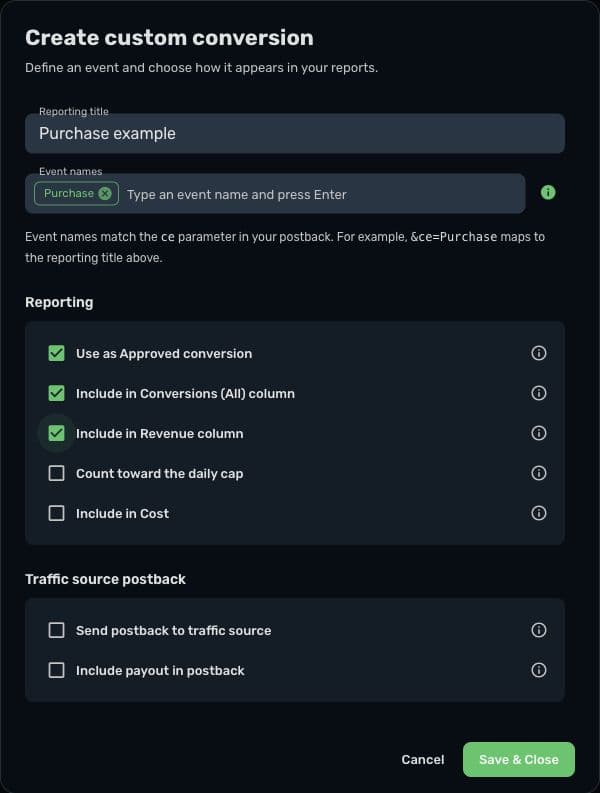
The postback parameter reference explains the supported fields. Start with an agreed business event: a registration, approved sale, deposit, or upsell. Give each event a reporting purpose rather than treating all callbacks as equivalent purchases.
Worked example: one visit becomes a €30 affiliate sale
Imagine a fictional network that supports an s2 field and a macro named {s2} for returning its saved value. That convention is an assumption for this example, not a universal provider format.
First, configure the offer URL in Skro:
https://affiliate.example/offer?s2={clickId}When the visitor reaches the offer, the network must receive a real generated ID instead of the literal {clickId} placeholder. The example hostname does not represent a working offer.
Then configure the network's callback. Its illustrative template might be:
https://skrotrack.com/postback?clickId={s2}&payout=30&payoutCurrencyCode=EUR&transactionId={order_id}&ce=PurchaseIn this fictional provider, {order_id} represents the macro for the transaction reference. Use your provider's actual macros and your configured tracking domain. Configure Purchase as an accepted custom event value in Skro before sending it.
Finally, verify the reporting decision. Suppose the real sale is approved, its payout is €30, and your event and status settings include it once in approved conversions and revenue. The expected outcome is one approved conversion with €30 of attributed revenue for the original campaign.
That result depends on the complete configuration. A parameter named Purchase does not prove that a payment was approved, and a callback with a payout does not automatically mean that every reporting column should increase.
Keep click, transaction, and event identifiers distinct
These values answer different questions:
- Click ID: which tracked interaction does this outcome belong to?
- Transaction ID: which transaction or conversion step is being reported?
- Event ID: when used for an outgoing conversion API, which corresponding event copies should the destination recognize as the same action?
One click can lead to more than one legitimate outcome. A retry of the same sale is different from a second purchase or an upsell. Configure duplicate-conversion and revenue-update behavior around that distinction, then test the specific integration. Do not assume that adding transactionId alone makes every callback idempotent.
For Meta browser/server matching, see the CAPI event-ID explanation. That is a separate concern from matching the incoming affiliate sale to its click.
Why a server callback can still fail to attribute
A callback avoids depending on the visitor's browser to send the conversion request at the moment of sale. It still needs a reliable source event and a preserved identifier.
Common breaks in the chain include a click ID omitted from the offer URL, a network macro that returns a different field, or a placeholder sent literally instead of being substituted. An incorrect custom event value, status mapping, currency, or required protection token can also change the result.
Protect the reference throughout redirects and intermediate pages. If your destination URL contains nested URLs or special characters, follow the guide's encoding rules and preserve the macros where substitution is expected. Inspect the final value received by the network rather than judging the template alone.
Validate one complete conversion before launch
Use a controlled campaign and the provider's supported test workflow. Confirm the visit first, then the actual identifier passed to the offer. Trigger one known event and inspect its returned values in Skro.
Check the event name, payout, currency, transaction reference, and approval behavior. If the outcome also needs to be sent to a traffic source, verify that outgoing delivery independently; a conversion appearing in Skro is not proof that another platform has received it.
Your next step is to choose the relevant affiliate network integration, configure its exact URL and macro names, and use the campaign troubleshooting checklist to verify each handoff. A small verified flow is a stronger launch foundation than a dashboard full of unexplained events.