

Launch your websites.
Keep hosting costs low.
Publish static websites and landing pages from the Skro dashboard to your own AWS account. Get global delivery, your own domain, and HTTPS with cost-efficient hosting that scales with your traffic.
Available on paid plans. AWS usage is billed separately.
Global delivery with HTTPS
- Hosted in your AWS account
- Global delivery with CloudFront
- Custom domains & HTTPS
Connect with the tools in your workflow



More campaigns. Less hosting overhead.
Your next landing page should be easy to launch and affordable to run. Skro brings website uploads, domains, certificates, and deployment status into the dashboard you already use for your campaigns.
Publish from one familiar dashboard
Upload your website as a ZIP, choose its domain, and deploy through Skro. Keep your websites organized by workspace alongside your campaign workflow.
Keep your hosting lean
Use S3 storage and CloudFront delivery for static pages, with no dedicated web server to maintain. Your AWS costs follow your usage and configuration.
Make every visit feel professional
Serve your pages on your own domain over HTTPS. CloudFront delivers content through its global network, bringing your pages closer to your visitors.
Your websites belong in your campaign workspace.
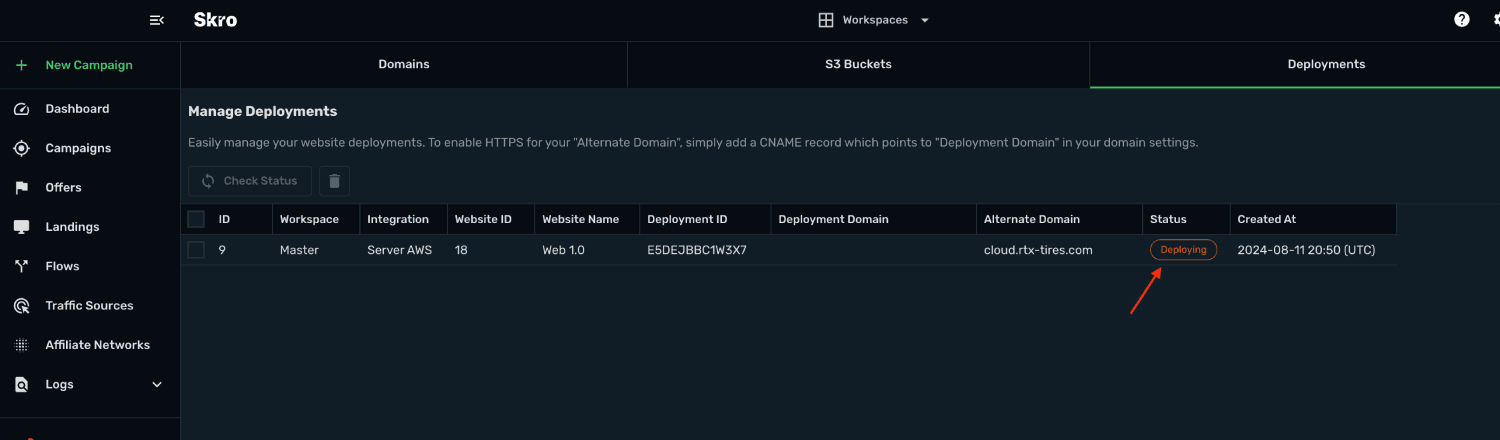
Manage domains, uploaded websites, and deployments from Skro. Check deployment status and upload a new ZIP when your next version is ready.
- Choose a workspace and connected AWS account
- Manage your domains and SSL certificate setup
- Publish updates by uploading a new website ZIP
Small files.
Lean running costs.
Static pages use storage and a delivery network, without a dedicated web server to maintain. Keep pages lightweight and let your hosting scale with your traffic.
Store only what you publish.
Amazon S3 holds your website files. Storage and request charges depend on what you store and how it is accessed.
S3 pricingReach visitors through the CDN.
CloudFront caches and delivers your pages worldwide. Delivery costs depend on traffic, visitor locations, and your AWS configuration.
CloudFront pricingSecure your custom domain.
Non-exportable public certificates from AWS Certificate Manager have no certificate charge when used with integrated services such as CloudFront.
Certificate pricingYour Skro plan covers deployment access. AWS usage is billed separately to your AWS account. Domain registration and DNS services may add their own costs.
Estimate your AWS costsFrom website files to a live campaign destination.
- 01
Connect your AWS account
Add the AWS integration in Skro using the setup guide. Your website files and delivery resources are created in your own AWS account.
- 02
Bring your domain
Add your domain and verify it for HTTPS. Use Route 53, Cloudflare, or NameSilo for supported DNS automation, or add the records manually.
- 03
Upload, deploy, and update
Upload a ZIP containing your static website and index.html. Select the domain, deploy, and check its status. Upload a new ZIP whenever you need to update the site.
Built to be set up.
Guides to get you there.
Follow the workflow for your platform, then test the full path before relying on campaign results.
What kinds of websites can I deploy?
Deploy static websites and landing pages built from HTML, CSS, JavaScript, and supported image files. Upload your files as a ZIP containing index.html. Server applications and CMS backends need separate hosting.
Do I need my own AWS account?
Yes. Connect your AWS account to Skro before deploying. Skro uses Amazon S3 for website files, CloudFront for delivery, and AWS Certificate Manager for HTTPS certificates.
How much does website hosting cost?
Static hosting can have low running costs, especially for lightweight pages. Your bill depends on storage, requests, traffic, delivery locations, and enabled AWS features. AWS charges are separate from your Skro subscription; use the current AWS pricing pages and calculator to estimate your setup.
Which Skro plans include deployment?
Website deployment is available on paid plans. Starter includes 3 deployments, Pro includes 25, Team includes 50, and Enterprise includes unlimited deployments. See the pricing comparison for the current plan allowances. AWS usage is billed separately.
Can I use my own domain and HTTPS?
Yes. Add your domain in Skro and complete DNS validation for its certificate. Skro supports DNS automation through AWS Route 53, Cloudflare, and NameSilo, with manual DNS configuration available for other providers.
How do I update a published website?
Open Websites → S3 Buckets in Skro, select your website, and use Upload to submit its new ZIP. Follow the deployment guide to verify the updated site.
Your next campaign needs a place to land.
Deploy your static website through Skro and keep hosting, tracking, and campaign decisions close together.